
Workflow Approvals App AX 20121.6 - Google Play
You'll be able to see results in few seconds.
Publisher Description

AX Workflow Approvals App is a customizable mobile solution for Dynamics AX 2012
AX Workflow Approvals App is a fully featured customizable mobile solution for Microsoft Dynamics AX 2012 that works with all AX workflow types.
The app is fully compatible with purchase orders, purchase requisitions, expense reports, timesheets, leave requests and more!
The app fully supports the AX security framework and provides top management ability to approve, reject or comment on a workflow, view its history and attachments through their Android devices.
KEY FEATURES:
* One-touch approval / rejection capabilities for any AX workflow type
* View all pending AX workflow approvals sorted by date
* Get instant alerts for pending workflow approvals through Push notifications
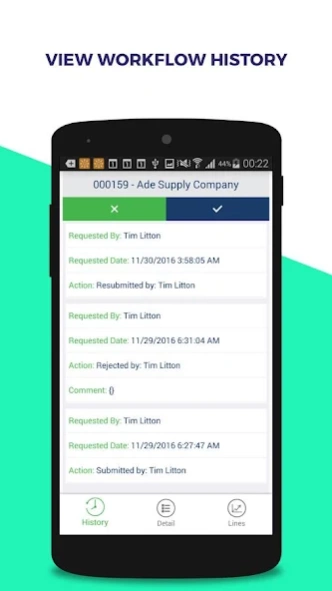
* Tap on a workflow to view its entire history
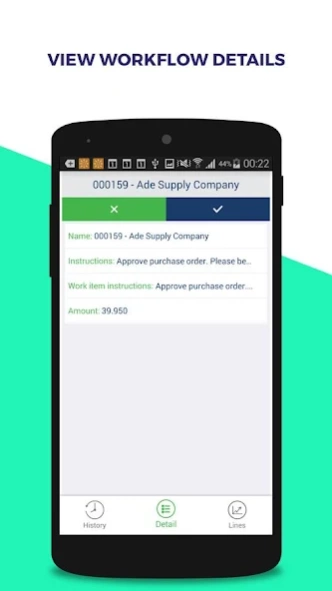
* View all related details associated with a workflow including all previous actions taken on it
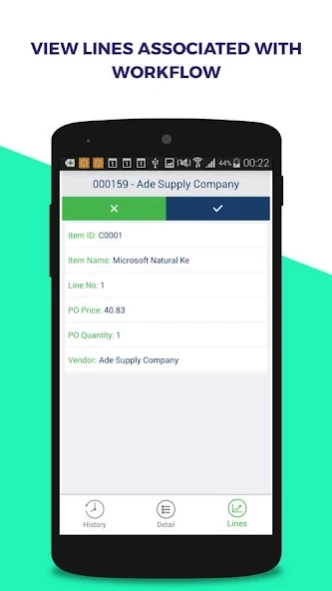
* View all lines associated with a workflow
* Enter comments while approving or rejecting a workflow item
* View all approved workflows on a separate list
* Add attachments to a workflow type
SETUP INSTRUCTIONS (TRIAL VERSION)
- Launch the app and go to the Server Settings screen using the link below the login fields. Add this Service URL (http://axdemo.folio3.com:8088/service.svc/json). Click on 'Test Connectivity' and then Save on top right before navigating back to the login screen.
- When back on the login screen, enter the following credentials to get into Workflow Approvals App:
User : administrator
Password : pass@word1
Domain : contoso
Company : USMF
DEPLOYMENT:
AX-Approvals solution supports two models for deployment:
Cloud Model
The app can be deployed on cloud services like Azure. The Middleware hosted in Azure can connect to the AX server using the secure Azure Service Bus.
On-Premise Model
Using this model, the middleware can be deployed to a Windows Server instance running IIS server which could natively connect to Dynamics AX.
BUSINESS & ENTERPRISE PLANS
From small biz to startup teams to enterprise companies, learn how AX Workflow Approvals App can work for you.
One size does not fit all - that’s why we've created flexible packages so you can choose one that works for your business.
You can choose from:
• Business Plan <= 25 Users
• Enterprise Plan <= 50 Users
If you need more than our Business or Enterprise plan offer then contact us and we will tailor a package that’s the right fit for you!
For questions or queries please regarding the setup & usage of the AX Workflow Approvals app, please get in touch with us at dynamics@folio3.com.
About Workflow Approvals App AX 2012
The company that develops Workflow Approvals App AX 2012 is Folio3 Software Inc. The latest version released by its developer is 1.6.
To install Workflow Approvals App AX 2012 on your Android device, just click the green Continue To App button above to start the installation process. The app is listed on our website since 2018-07-11 and was downloaded 0 times. We have already checked if the download link is safe, however for your own protection we recommend that you scan the downloaded app with your antivirus. Your antivirus may detect the Workflow Approvals App AX 2012 as malware as malware if the download link to com.approvals.f3.approvalsdynamics is broken.
How to install Workflow Approvals App AX 2012 on your Android device:
- Click on the Continue To App button on our website. This will redirect you to Google Play.
- Once the Workflow Approvals App AX 2012 is shown in the Google Play listing of your Android device, you can start its download and installation. Tap on the Install button located below the search bar and to the right of the app icon.
- A pop-up window with the permissions required by Workflow Approvals App AX 2012 will be shown. Click on Accept to continue the process.
- Workflow Approvals App AX 2012 will be downloaded onto your device, displaying a progress. Once the download completes, the installation will start and you'll get a notification after the installation is finished.
Program Details
System requirements
Download information
Pricing
Version History
version 1.6(3)-demo
posted on 2018-07-12
1- Workflow Delegation
2- Request Change
3- Line and Header level Attachments
version 1.0.0.1.0
posted on 2016-12-27
Disclaimer
Official Google Play Link
We do not host Workflow Approvals App AX 2012 on our servers. We did not scan it for viruses, adware, spyware or other type of malware. This app is hosted by Google and passed their terms and conditions to be listed there. We recommend caution when installing it.
The Google Play link for Workflow Approvals App AX 2012 is provided to you by apps112.com without any warranties, representations or guarantees of any kind, so access it at your own risk.
If you have questions regarding this particular app contact the publisher directly. For questions about the functionalities of apps112.com contact us.
